Propaganda changelog

v0.9.17

A blog set to live on another site now sends readers there

  • A blog set to live on another site now sends readers there. Its own Propaganda address forwards every page to the same post on your site, so search engines keep one copy.
  • Comments can change several passages at once. When a comment needs edits in more than one place, Propaganda lists them and asks first; say yes and one edit changes them all.
  • Send back rewrites the whole post. Send back is always available in review: write one note on what should change and the Writer writes the post again from it. A new angle gets fresh research; a change of tone, order or length works from what the draft already has. Comments still edit only the passages they are on.
  • Claude connector: the draft link Claude gives you opens on the right blog, posts sent from Claude carry your name, and Claude can tell you which blog it is connected to.
v0.9.16

Fewer failed drafts

  • Fewer failed drafts: the Writer no longer fails a post over a stray quote or backslash in its Markdown.
  • Bylines are safer: a post's author can only be someone on your site, and a comment always shows who really wrote it.
  • Your writing survives two devices. When a post changed elsewhere while you had unsaved edits, the newer copy is shown and yours is kept in the post's history; a post deleted elsewhere keeps your unsaved edits as a new draft.
  • Offline edits sync sooner: text you write while offline now reaches the server as soon as the connection is back, instead of waiting for your next keystroke.
  • Social: follow your competitors, local voices and searches on YouTube, Reddit and Google; every morning Propaganda drafts comments for the posts worth answering, shown the way each platform shows them, and keeps count of what you posted (Instagram and Facebook come next).
v0.9.15

Pay for Pro in the app

  • Pay for Pro in the app. A new site picks Pro, answers the strategy questions and pays by card through Stripe.
  • Lite to Pro. Lite's Upgrade page opens the same checkout, and the site becomes the full app once paid.
  • Settings > Plan. Shows your plan and when it renews or ends. Change your card, see invoices or cancel on Stripe's billing page. A cancelled plan runs to the end of what you paid for.
  • Home tells you when a payment fails or a plan has ended, with a button to fix it.
  • Invite codes. "Have an invite code?" on the new-site screen makes Pro free for that site.
  • Sites you already have stay on their current plan.
  • Readership counts real readers. Visits from your own team and from automated browsers are left out.
  • Goal charts keep their size. Labels on the quarter charts stay readable on wide screens and phones, the "Goals set" marker sits on the date axis instead of looking like a score, and an empty chart says there's nothing yet.
  • Comment from the keyboard. Select text in the editor and press Cmd+Shift+M to comment on it.
v0.9.14

Dragging a post to a new day reschedules it

  • Fixed: dragging a post to a new day in the calendar now reschedules it.
v0.9.13

Scheduled posts go out on time, and you can drag them to a new day

  • Scheduled posts publish on their own. A post set for a date and time now goes live when that time comes. If one is more than a day late, for example because the server was down, it waits for you to publish it.
  • Drag a post to another day. On the pipeline calendar, in week or month view, drag a post to a new day to reschedule it. The calendar is now a side panel next to the board, and you can resize it.
  • Your blog works with AI agents in the browser. Agents can search your published posts, read them and quote them from the page. If your newsletter is on, they can subscribe a reader too. Analytics has a new card that counts these agent visits.
  • Goals show real numbers. The Readership card now counts your blog's real views and reading time. Before, it showed zero. Each goal on Home opens its own page with the quarter's progress, and the marks for goal changes are grey.
  • Finish Getting started your way. Once your plan is approved, an "End the Getting started guide" button closes the guide. Its steps also tick off from the board, so work you do in the pipeline counts.
  • New plans on the upgrade page. The page now lists Lite, Pro and Managed.
  • Clearer review cards. Clicking a card shows all of it. A card says so when its words are no longer in the post. A card closes on its own once you fix the same thing yourself. Accepting a fix no longer leaves a double full stop. The fact checker only quotes words that are actually in your post. A crossed-out word no longer runs into the next one.
  • Easier pitches to read. Quoted text and topic names in a pitch now stand out as small chips. The batch panel uses plainer words.
  • One bad idea no longer stops a batch. If an idea's pitch fails its checks twice, we skip that idea and pitch the others.
  • Tidier lists in the editor. List items sit closer together. A numbered item that has items under it keeps its number.
  • Onboarding addresses. We only say an address is available once the server agrees. A slow answer about an old address can no longer overwrite the one you picked.
  • Top posts. A post you renamed shows as one row, under its newest address.
v0.9.12

Maintenance

  • Maintenance. Small fixes behind the scenes. Nothing changes in how you use Propaganda.
v0.9.11

Maintenance

  • Maintenance. Small fixes behind the scenes. Nothing changes in how you use Propaganda.
v0.9.10

Your iPhone syncs as soon as you come back

  • Your iPhone syncs as soon as you come back. If the phone locked or you switched apps in the middle of a sync, the rest waited for your next edit. Now we finish it the moment you return. Nothing you wrote was ever at risk.
  • One title per post. A draft we write from material you send no longer opens with a second headline under its title.
v0.9.9

Your first plan always reaches you

  • Your first plan always reaches you. If the plan we write still misses one of our own style checks on its second try, we now send it to you anyway, since you read and approve it before anything happens. It used to stop with "We stopped".
v0.9.8

Your first plan no longer stops on one search

  • Your first plan no longer stops on one search. When the plan we write for a new workspace picked a Google search just outside our limits, the whole plan could stop with "We stopped". Now we drop or regroup that search from its numbers and your plan goes through.
v0.9.7

Three new layouts for your blog

  • Three new layouts for your blog. Plate, Ledger and Reel join the choices in Design. Plate is light with big covers, Ledger has dated rows with a picture and figures in the margin, and Reel is dark with tall poster tiles. Each one can put a post's picture on top, beside the title, or in the text.
  • Blogs stay up when a lookup fails. If your blog can't reach us for a moment, the page you were reading stays on screen. It no longer flips to "Site not found".
  • Terms and Privacy in Settings. The links now sit at the foot of every Settings page, and the account menu is shorter.
  • Granola keeps working when a note is deleted. A meeting note removed from Granola before we read it is skipped, and your connection stays healthy.
v0.9.6

Send a letter to the readers it missed

  • Send a letter to the readers it missed. Each post shows how many subscribers its letter reached out of how many should have it, on the post's details and in Content > Newsletter. When some are missing, one button sends it to just them, and nobody gets a letter twice.
  • Newsletter signup on every design. Blogs that use a theme now show the signup under each post, like the original design does.
  • Letters link to where your blog lives. For a blog hosted on your own site, the links in a letter go to the post there.
  • Clearer signup errors. A signup that fails says why in plain words, with a code we can look up.
  • Waiting for confirmation. Subscribers who haven't clicked their confirm link yet are labelled as waiting for confirmation.
v0.9.5

A title typed fast is kept

  • A title typed fast is kept. A title typed just before you moved to the subtitle could be saved empty. Every word you type now saves.
  • Share on iPhone opens the sheet. We draw the card while you set it up, so Share… opens your phone's share sheet on the tap. If you tap before the card is ready, we say so and the next tap shares at once.
  • Noir follows the text size. On a Noir share card with no photo, the plus and minus buttons now grow and shrink the text.
  • A photo that won't load says so. When a share card's photo can't be loaded, the card goes without it and tells you why, where it used to show a broken image.
v0.9.4

One click to confirm a newsletter signup

  • One click to confirm. The link in a newsletter confirmation email now confirms the address as soon as it opens. The confirm, unsubscribe and like pages carry the blog's logo, name and a simple footer.
  • Sample posts in the Design studio. A blog with no posts yet sees each template filled with sample posts, so you can judge a design before you write.
  • Design preview for blogs hosted elsewhere. When your blog lives on your own site, the Design studio previews the blog we host for you, where the themes apply, instead of an error page.
  • A failed image upload says so. The editor tells you why an image didn't upload and what to do, where it used to leave an empty grey box.
  • Link previews for release notes. A link to these notes shows a title, a summary and an image when you share it.
  • Cleaner editor menus. The editor's menus and panels use the interface font; only your post is set in serif.
v0.9.3

Maintenance

  • Maintenance. Small fixes behind the scenes. Nothing changes in how you use Propaganda.
v0.9.2

Change your strategy by talking it through

  • Change your strategy by talking it through. Ask in the chat for a change to your strategy and we draft it as an update to your approved goals. You can answer back in the same conversation, then accept or decline. Goals is now called Strategy.
  • Pitch notes get an answer. A note you leave on a pitch is answered in the draft, and Review shows it as done with our one-line reply.
  • No more Inbox. Pitches and review live on the Pipeline board, and flags live in the Knowledge base.
  • Rulings name claims by their words. A ruling in the Knowledge base now quotes the claim it means, with a link to it, never a code.
  • Bigger or smaller text on share cards. Plus and minus buttons beside the photo row set the text size, in the preview and the image you download.
  • A Published column. The posts table can show when each post was first published, and sort by it.
  • Scheduled days in the date picker. When you approve or reschedule a post, days that already have one scheduled show a green dot.
  • Faces on review comments. Comments show the member's Google picture.
  • Blogs load cleanly. No blank screen below a post while it loads, and the Editor button shows right away.
  • Rules ask before they're lost. In a collection's rules, Escape, a tap outside or Cancel asks first when you've changed them, and the dialog keeps your keyboard inside it.
  • Terms and Privacy. Sign-in and the account menu link to our Terms and Privacy Policy.
  • Newsletter confirm links open. The link in a newsletter confirmation email now opens the confirmation page, even in a browser that has the editor open.
  • A tab bar on phones. On a phone you now move with a tab bar at the bottom: Home, Pipeline, Content, Knowledge and More on the full plan; Home, Posts, New post and More on Lite. Lite drops Planning and Upgrade; the menu drops Admin and the plan switch.
  • A narrower sidebar. The sidebar is slimmer, with tighter rows.
v0.9.1

A menu on every phone page

  • A menu on every phone page. On a phone, Home and Planning in Lite had no way to open the menu. Both now have a slim top bar with the menu button and the page's name.
v0.9.0

A newsletter for every blog

  • A newsletter for your blog. Turn it on in Settings > Newsletter and each post gets a signup at the end (on the original blog design). Readers confirm their address by email, and only confirmed readers get letters. When you publish a post for the first time, we send it to them ten minutes later; unpublish within those ten minutes and the letter stays unsent. A republish never sends again.
  • See who reads your letters. Content > Newsletter shows each letter with how many it reached, opened and liked, and every subscriber with their letters and opens. An address that bounces or reports spam gets no more letters.
v0.8.10

Every fact sourced or cut

  • Every fact sourced or cut. Before a draft goes to review, we list each fact in it that needs a source and look for one. A fact we can source gets its link; a fact we can't is cut from the draft.
  • Dialogs close when you click outside. Every dialog now closes on a click outside it or on Escape. If you've written something you haven't sent, we ask before throwing it away.
v0.8.9

Goals that add up

  • Goals that add up. The batch count in Goals no longer reads "Batch 3 of 2": it counts the batches your plan calls for. A ? next to "Topics on target" explains the rule: a topic is on target once its published posts reach the low end of its goal.
  • Duplicate facts strengthen the original. When a proposed fact repeats one already in your knowledge base, we add its supporting quotes to the existing fact as evidence, so they are not lost.
  • Blogs hosted elsewhere. If your blog lives on your own site, the Design studio says so and greys out the theme options, since that site sets the look.
v0.8.8

Cleaner review notes

  • Blog views are counted again. Views on your blog went uncounted from October 10. Each reading session now counts once, without cookies, and bots are left out, so the numbers read lower than before.

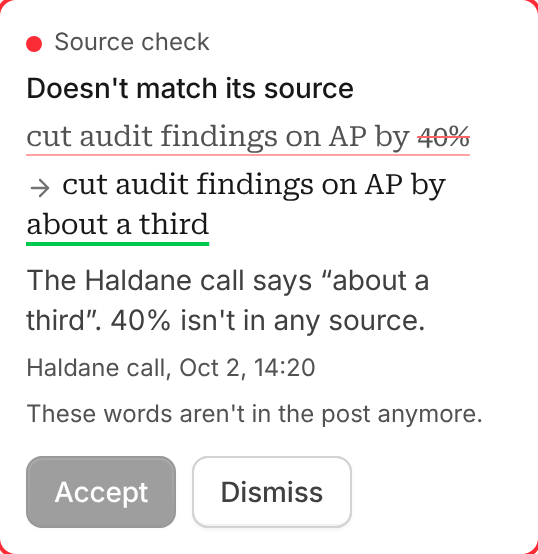
  • Fixes show only what changes. When a source check suggests a fix, the sentence shows the words it removes struck through and the words it adds underlined, so you see the change at a glance.

    A source check fix with the changed words marked

  • Tighter comment cards. Dates are short (hover for the full one), long names stay on one line, and Delete and Resolve are small icons. Press Enter to send a reply, Shift+Enter for a new line.

  • Toasts you can click. A toast about something you can open is the link: click it to see the published page or the approved draft.

  • Tidier details. In a post's details, the menu arrows for Stage, Collection and Author show only on hover, so every value lines up on the right.

v0.8.7

Sharper drafts

  • Sharper drafts. When we review a draft, we now catch sentences where a general group does the acting ("models", "teams", "a tribunal") and a named company or person should. We rewrite those, score the draft again, and make a second pass on whatever is still too general.
  • Redrafts run side by side. Several posts sent back for a redraft at once no longer wait on each other.
v0.8.6

Invite codes

  • Invite codes. Propaganda is invite-only for now. Creating a site takes an invite code, and anyone a site invites gets in without one. Codes are three words, and Admin > Invites makes, lists and revokes them.
  • Recent sources first. Drafts prefer the most recent source. An old figure about something that changes fast, like search, AI or tools, keeps its year in the sentence and is never presented as how things are now.
  • More source links. Searches keep more of their results, so drafts have more sources to link.
v0.8.5

Sources with good judgement

  • Sources with good judgement. Drafts now cite sources the way a company blog should: they link a source for numbers, results, quotes and facts that sound surprising, and leave stories about what happened, common knowledge and your own argument alone. A company or practitioner reporting its own data counts as a source, and so does a product's own documentation for what it does.
v0.8.4

Edits wait for Republish, authors get their own tab, and calls give fewer, better ideas

  • Edits to a published post wait for Republish. Readers keep seeing the version you last published while you edit. The editor says when a post has unpublished changes, and Republish puts them live.
  • An Authors tab in Settings. Every author's name, picture and description in one place, shown on their author page and under their posts. Owners can add an author who isn't on the team.
  • Remove someone from the team. Owners find Remove in a member's role menu, with a confirmation first.
  • Fewer, better ideas from calls. From each call we keep only what could end up in a post: up to five facts that are true today and up to five ideas a reader would care about.
  • Drafts get their source links back. We now follow Google's redirect links to the real page, and research looks for studies, surveys, reports and official documentation instead of how-to guides.

We add a table that holds each post as readers last saw it, plus author records. Every published post is copied as it is now, so no page changes. No data is changed or removed, and we back up before the update.
v0.8.3

Granola keys connect, and contesting a flag shows its progress

  • Granola keys connect. We fixed a problem on our side that stopped a pasted Granola API key from connecting. When a key is refused, we tell you why, and a failed attempt no longer leaves a broken connection behind.
  • Contesting a flag works and shows its progress. When you say a flagged statement isn't inconsistent, we now finish drafting the change instead of stopping with an error, and the card shows the progress and updates by itself when it is ready. The option now reads "Tell us why both can be true. We'll review your case and decide."
v0.8.2

Granola calls in your workspace, fact suggestions that remember your answer, and a pipeline that loads after a break

  • Connect Granola. In Settings, Connections, paste your Granola API key and we read the calls you take from then on. Calls from before you connect stay out. The key is stored encrypted and never shown again, and you can disconnect at any time.
  • Fact suggestions remember your answer. When you mark a suggested fact as "Not a fact", it stays hidden on every later review of your posts, and we stop suggesting it.
  • Remembered facts keep their dates. A fact you remember is dated from that day, and a fact about the past keeps its end date, so the sentence itself stays free of dates.
  • The pipeline loads after a break. Coming back to a tab that sat idle no longer shows the pipeline as failed while your sign-in wakes up.

We add one field to stored review decisions and two optional dates to remembered facts. No data is changed or removed, and we back up before the update.
v0.8.1

Drafts that review their own style, posts sized to their subject, and search engines sent to where your blog lives

  • Drafts that review their own style. Before a first draft reaches you, we score its style and rewrite only the sentences that read as machine-made, and opinions read "we think" instead of "our bet".
  • Posts sized to their subject. Each pitch now says how long its post should be, from 500 to 2,500 words, and the draft follows it.
  • Sources you can follow. Drafts link the sources they draw on, and fact checks only flag what a source could actually settle, so you see fewer flags and each one is worth a look. When a source doesn't back a claim, we remove the claim, or ask for a link, instead of softening it.
  • Comments open with a double click. Double click a comment, or use its small open icon, to open it in the dialog. An open comment is shaded gray, and the dialog closes once you accept an edit.
  • Search engines find your blog where it lives. When your blog lives on another site, its pages tell search engines that address is the original, so your own domain gets the credit.
  • Edits from Claude wait for Republish. Claude can no longer add a version to a published post, so nothing reaches readers until you edit and republish it in the editor.
  • Lists look like the rest of the post. Bulleted and numbered lists use the same text style as paragraphs in the editor and on your blog, and share cards show them with bullets.
  • Preview site stays on your blog. In the installed app, Preview site no longer sends you straight back to the editor.
  • The posts table fits its card. It no longer runs past the edge of the page, and dates show short on one line, like 5m for five months or 3y for three years.
  • The pipeline loads after an update. When our server restarts after an update, the pipeline waits a moment and loads instead of showing an error.

We add two public settings so blog pages can name your blog's address. No data is changed or removed, and we back up before the update.

v0.8.0

A simpler pipeline, a block handle like Notion's, and a reason on every greyed-out button

  • A simpler pipeline. The Selected stage is gone. A brief waiting for us to write it sits under Writing, which also holds the form to hand us a post and Write all now. The review stage is now called Draft.
  • Your first draft, reviewed like the rest. Getting started no longer has its own approval strip. Approve the first draft from the footer like any other post, and the step tells you when it goes out.
  • A block handle like Notion's. The handle beside each paragraph sits where Notion puts it, and the post arrows in the top bar keep their room so they never cover the stage.
  • An honest chat badge. The number on the chat button counts only replies you haven't read, in a new chat too, and stays right after a reload.
  • No made-up descriptions. A post with no description written shows none on the blog, instead of repeating its first paragraph.
  • Every greyed-out button says why. Hover any button you can't press to see what it needs.
  • Fact checks that finish. When a fact check runs out of room before it answers, we ask again instead of stopping.
  • Fewer false alarms. We stopped reporting crashes that weren't, and a lost live connection only counts while the page is open in front of you.

No data is changed or removed, and there are no schema changes.

v0.7.2

A way back to the editor from your blog

  • An editor button on your blog. After you open your blog from the editor, a small "editor" button sits at the bottom right of its pages and takes you back. Readers never see it.
  • /admin on any blog address. Adding /admin to your blog's address, on our subdomain or your own domain, opens the editor.

No data is changed.

v0.7.1

Post links follow a blog that lives on your own site

  • Links to your posts go where your blog is. When your blog lives on another site, set it on the Site page as Somewhere else, with its address. The post's address, Preview, Share, the publish message and the blog link then all point there.

No data is changed.

v0.7.0

An editor that answers your comments, authors on every post, and chat in a large window

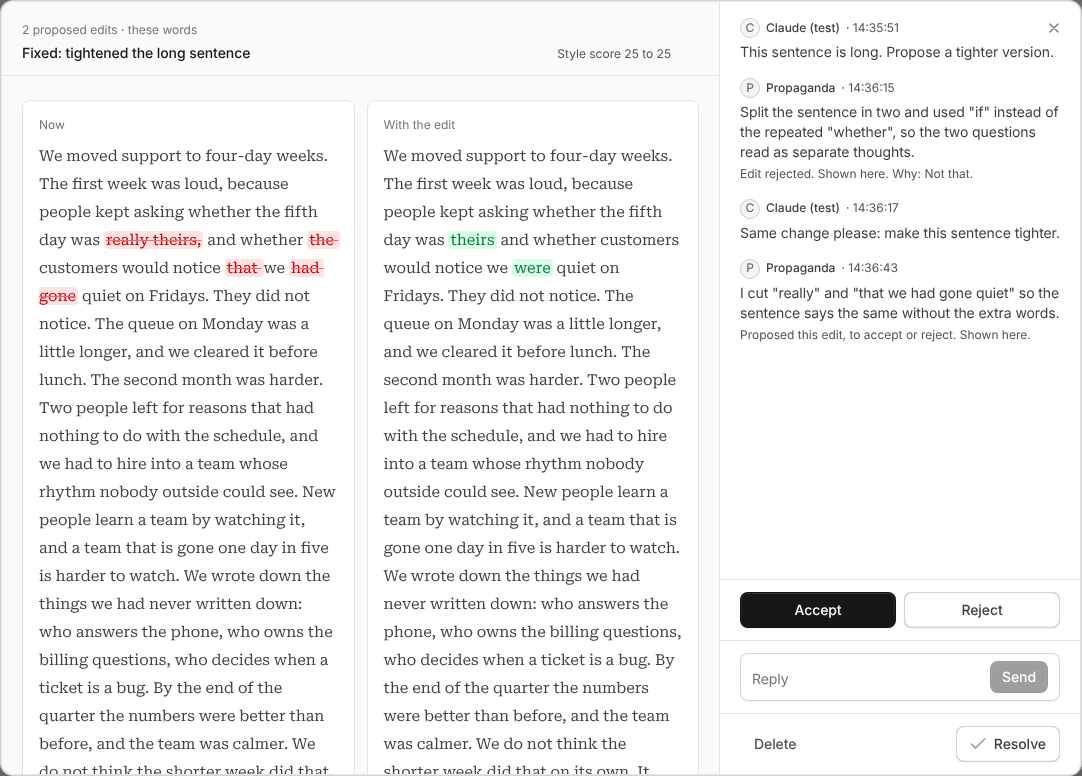
  • Comment, and we answer. Leave a comment on a post and our editor replies in the thread: an answer, a question back, or one proposed edit you accept or reject. An accepted edit lands as a new version, resolves its comment, and shows what changed word by word. A rejected edit gets options, and we never propose it again. Comments open in the Review panel in one click.
  • Daily limits for the editor. Each tenant has a daily budget for these replies, shown beside the thread. At the limit, a comment waits and is answered after midnight UTC.
  • Authors on every post. Pick a post's author in Details. Blogs show a byline with the author's photo, an author card under the post, and an author page listing their posts. Posts written for you are signed by PPGD, which stays on every team.
  • Chat in a large window. Full chat opens over the page you are on, from the sidebar or Cmd+Shift+J, and keeps one conversation whether it is small, large or closed. Chat can now read a post and propose an edit, with a card to apply it.
  • Version compare, word by word. Changed paragraphs show removed words struck through and added words highlighted, as in the comment threads.
  • Republish. On a published post, Published in the status menu republishes it: the blog rewrites its pages and tells search engines, and the words and publish date stay as they are.
  • Scheduling in your time. Approving a post for today after its publish time schedules it for now, and Approve and publish now does both at once.
  • From Claude, straight to the blog. Claude can send a post with its sources and notes, answer our questions about it, and add an edited version to a post you already have.
  • Address and Preview. A post's address sits on one line with the site as a prefix and a copy button, and Preview sits next to Share.
  • Smaller fixes. Every page has a plain header, a click outside closes any dialog, posts show their number instead of an id, empty tenants get a button to create their first collection, and search engines hear about a changed page once it settles.

A comment thread with a proposed edit, shown word by word

We add new tables and columns only. No data is changed or removed, and we back up before the update.

v0.6.6

Fixes for the blog, the editor and the release notes

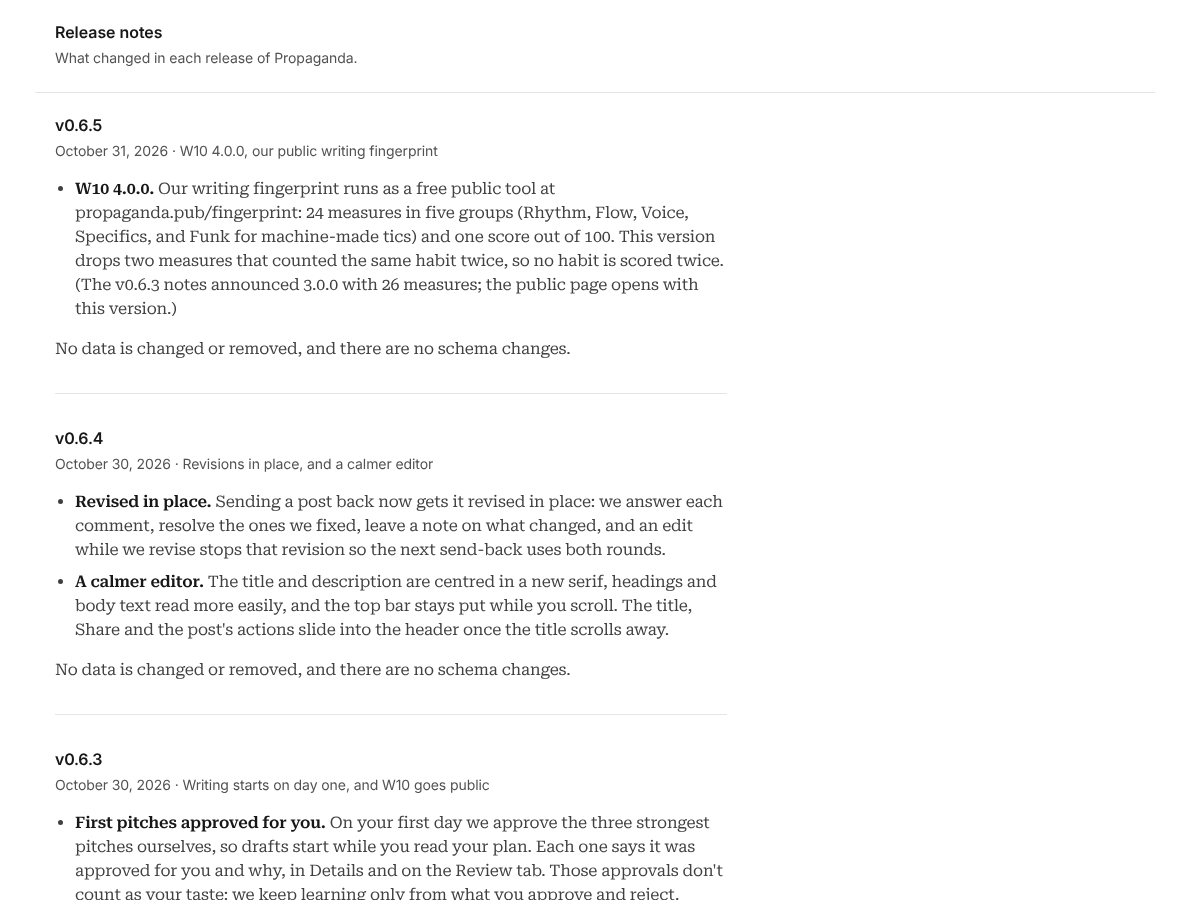
  • Release notes open again. The release notes page was blank. It now lists every release, newest first.
  • Draft previews. Previews open again for drafts that don't have an address yet.
  • Themed blogs keep their look. Spacing, layout and fonts stay right when the page first loads.
  • Drop caps. The large first letter of a post no longer takes an opening quote mark with it.
  • Editor. Long titles no longer get cut off, the description sits closer to the title, the post body starts a clear 48px under the line, and clicking an HTML block now just outlines it in blue.
  • Waitlist. We hear about each new waitlist signup right away.

The release notes page, open again

No data is changed or removed, and there are no schema changes.

v0.6.5

Maintenance

  • Maintenance. Small fixes behind the scenes. Nothing changes in how you use Propaganda.

No data is changed or removed, and there are no schema changes.

v0.6.4

Revisions in place, and a calmer editor

  • Revised in place. Sending a post back now gets it revised in place: we answer each comment, resolve the ones we fixed, leave a note on what changed, and an edit while we revise stops that revision so the next send-back uses both rounds.
  • A calmer editor. The title and description are centred in a new serif, headings and body text read more easily, and the top bar stays put while you scroll. The title, Share and the post's actions slide into the header once the title scrolls away.

No data is changed or removed, and there are no schema changes.

v0.6.3

Writing starts on day one

  • First pitches approved for you. On your first day we approve the three strongest pitches ourselves, so drafts start while you read your plan. Each one says it was approved for you and why, in Details and on the Review tab. Those approvals don't count as your taste: we keep learning only from what you approve and reject.

No data is changed or removed, and there are no schema changes.

v0.6.2

Posts kept as written, and HTML in a post

  • Keep my text. When you send a post from Claude and say to keep it, it lands in review exactly as you wrote it, with your images in place. We don't redraft it. Images you sent but didn't place are listed back to you.
  • HTML block. A post can now hold a block of your own HTML, such as a table, a chart or a before and after. The blog shows it safely: anything that could run code or load something unexpected is left out.

No data is changed or removed, and there are no schema changes.

v0.6.1

Claude calls served by Anthropic

  • Claude models. Calls to Claude models are now always served by Anthropic itself, so they can draw on our own Anthropic account. Nothing changes in what the agents write, how calls are logged or how budgets count them.

No data is changed or removed, and there are no schema changes.

v0.6.0

We learn your business before we plan and write

  • A picture of your business. We read your onboarding answers, your plan and your website, and write one document about your company: who you are, the views you hold, what you offer and what is still planned, how you price, who you sell to and how you sound. Plans, pitches and drafts now start from it, so they talk about what you have actually built, in your own terms.
  • Facts you can check. The statements the picture quotes from your material go to your knowledge base as proposed facts, each tied to the words it came from, and each is checked on its own before anything relies on it. Prices, people and anything that would hurt the business in public stay out.
  • Stronger pitches and drafts. We now write your pitches and your drafts with our most capable model.
  • Nothing overwritten. When we write the picture again it becomes a new version, and the earlier one is kept.

The schema gains one table for these pictures. No data is changed or removed.

v0.5.9

Plans that read search data more carefully

  • Plans and search data. When a search your plan targets is falling fast, the plan now says so and explains why it still targets it. Searches that only a competitor ranks for are treated as context, never as targets. The plan either targets the searches for your product's category or says in a sentence why it leaves them out. And it only talks about what your company has actually built.

No data is changed or removed, and there are no schema changes.

v0.5.8

New drafting instructions and a tidier keyboard bar

  • Drafts. Drafts and revisions follow new instructions on how the writing should sound: sentences about named people, companies and things, "you" only where the reader acts, a real mix of short and long sentences, and more sentences that open on a clause. Facts about your company still come only from the brief and your knowledge base, and every number links its source.
  • The keyboard bar on a phone. The bar is now Text, Heading, List, Link, Image, Comment, Share and Done, and all of them fit on the screen. Text opens a row with bold, italic, underline, strikethrough and text colours, and Heading opens H1, H2 and H3, each turning back into a paragraph with a second tap.

No data is changed or removed, and there are no schema changes.

v0.5.7

Claude connects in one step and knows when to blog

  • One thing to add in Claude. Connecting Claude to your blog now takes only the Propaganda connector. The connector itself tells Claude when to send something to your blog, when to offer to, and how to prepare the material, and its action is named "Send a post to your blog".
  • Ready for Claude's directory. Each of the connector's actions has a plain title and says whether it changes anything, and the Connect Claude page has a sign-in for the directory's reviewers. Sign-up stays Google only.

No data is changed or removed, and there are no schema changes.

v0.5.6

A knowledge base that judges each fact on its own

  • Facts are judged one by one. When we build a knowledge base from your material, each proposed fact now gets its own verdict instead of one verdict for the whole batch, so a single weak fact no longer holds back or drags in the ones around it.

No data is changed or removed, and there are no schema changes.

v0.5.5

A tidier Connect Claude page

  • Connect Claude, redrawn. The page where you connect Claude to a blog is now one centered card with Claude's mark next to ours. Each account shows once, with its blogs and their addresses under it, Allow takes the full width, and Cancel sits under it. Another account and the address Claude returns to are in the footer, and a blog row shows a clear keyboard focus.

No data is changed or removed, and there are no schema changes.

v0.5.4

One Review list, a stage chip, a footer with the decisions, and an icon rail

  • One Review list. Review and comments are now one list in text order: source checks, knowledge base notes, pitch notes and your team's comments, with the stage, due date and a one-line tally on top. A box at the foot takes a comment on the whole post. Drafts waiting in review get their checks run, so the list has a report by the time you open it.
  • A stage chip that says what happens next. The post's stage is a coloured chip beside its breadcrumbs. Press it to see the road the post is on and the moves open to it: Send for review, Approve with a day, Reschedule, Publish now, Send back, Not now, or Reject with an optional reason. Approve asks for the day and stays on the post.
  • A footer with the decisions. The bar under the post shows its length and how many review issues are open. It has Send for review while a draft is being written, and Send back and Approve while it waits on you. Send back passes your open comments to the writer as one note.
  • An icon rail. The side panel is a rail of icons, Details, Review, Share and Brief, that opens one pane at a time. Details lists the stage, collection, dates, address and tags as plain rows you click to edit, and the source material of an assigned post is under Brief.
  • Writing state. An editor shows when we are writing a post, and when we have stopped. While we write, the top bar shows the state; on a phone it drops the post id, the word count and the arrows so it fits.
  • Formatting on the keyboard bar. On a phone, bold, italic, heading, list, link, image, comment and Share live on the keyboard bar, and the floating toolbar that fought with the iPhone's own menu is gone. The title and subtitle keep Share and Done, so a tap there no longer changes the text below.
  • A leaner toolbar. The selection toolbar keeps a heading level, text styles, two-column colours, link, image, mention and comment.
  • Colours in code blocks. Code blocks colour ten languages (Bash, JavaScript, TypeScript, HTML, CSS, JSON, Java, Python, SQL and YAML). The colours load only when a post has a code block.
  • Blog views count again. A view on a blog reaches our counter from the right address.

No data is changed or removed, and there are no schema changes.

v0.5.3

Chat answers in our voice, and crashes get reported

  • Chat speaks as "we". Chat no longer names the agents that do the work, and a plain greeting gets a one-line answer instead of a list.
  • Crashes get reported. When your browser kills a Propaganda tab, we now hear about it, so we can find and fix the cause.

No data is changed or removed, and there are no schema changes.

v0.5.2

Share cards and writing on a phone

  • Share cards on a phone. The card opens on a full screen with the photo sized to fit, and the toolbar stays clear of the iPhone's own menu. On Safari the photo is now in the downloaded picture. Share sits on the keyboard bar, and Share… is the one main button.
  • Writing on a phone. A Done bar above the keyboard puts it away, and the keyboard bar keeps the line you are typing above itself.

No data is changed or removed, and there are no schema changes.

v0.5.1

Share cards, and drafts with more variety

  • Share cards. Select words on your blog or in the editor and press Share. You get a story card, 1080 by 1920, with a photo, in one of five templates, and it links to the post. Download it, or share it from your phone's share sheet. Share on a post shows the whole post and suggested quotes as cards, and says why quotes could not be found when they cannot.
  • Drafts with more variety. Drafting now measures flat, same-shaped sentences and asks for connectors, contrast and description, so a draft reads less like a list.
  • Pipeline. The calendar stays hidden until you press Calendar.
  • After an update. If a page from an older version of the app is gone, the app reloads once and carries on.

No data is changed or removed, and there are no schema changes.

v0.5.0

Search Console in the plan and the pitches, a Selected stage, previews and steadier drafting

  • Search Console, every week. For blogs we host, the plan and the pitches now read the searches your blog already gets. The searches table in Goals is redesigned: four two-line cells under bucket headers, so a row reads at a glance. The numbers are kept weekly, for trends later.
  • A Selected stage. The pipeline has a stage for posts you picked. We start the writing the moment you select a post, and when you send a draft back, so a post cannot get stuck between the two.
  • Preview before you publish. An unpublished post opens at a preview address that only your team can see, and search engines are told to skip it.
  • Steadier drafting. Your own voice goes over the craft rules, and code measures the rhythm of a draft. Write now retries a run that died, and a draft started during setup now lands in the right post.
  • Dates search engines can trust. A post's "updated" date on the blog, in the sitemap and in the feed moves only when its title, subtitle, excerpt or text changes, and no longer when you favourite it or move it.
  • Chat and phone. Chat shows your conversation after a refresh. On a phone the posts list, the New post button, the agent rules dialog and sign-in load are fixed. A selected row no longer covers its card's border. Signing in from Claude no longer shows a "site not found" page.
  • Safer by default. Members can write only the fields they are meant to write on six tables that had inherited wider access.

The schema gains a content date on posts, a weekly Search Console table and a new model price, and it closes the default grants on six tables. No data is changed or removed.

v0.4.2

Connect Claude by signing in

  • No token to paste. In Claude, add a custom connector with the address shown in Settings > Connections > Claude, or press Connect on the Propaganda plugin. Claude opens Propaganda, you pick the blog and press Allow, and it appears in your list of connections.
  • Tokens still work. For scripts and other tools that cannot sign in, you can still make a token in the same place.

No data is changed or removed, and there are no schema changes.

v0.4.1

Writing starts again, and a sharper plan

  • Approve works when the request is held back. A request that was refused before it reached us is retried once, and the error now says what happened instead of failing without a word.
  • Write now. Posts that are waiting to be written read as tasks, with their planned date, a Write now button on each and Write all now on the column. A post started by Approve or by "We draft it" counts as started.
  • Getting started. Once every first pitch is reviewed, you are guided to the next step.
  • Real searches in the plan. For blogs we host, the plan reads the real searches your blog already gets.
  • A sharper plan. Named competitors are looked up, the limits behind each number are stated, a revision reuses the data it already has, and growth is compared with the same months last year.

No data is changed or removed, and there are no schema changes.

v0.4.0

The Claude plugin, real blog pages and a team

  • Claude plugin. Install it in Claude desktop and ask for a post to be written for one of your collections. You can list your collections and assign a post to one, with your own notes and source material attached, and it goes through the same drafting, review and fact check as any other post. Access is by a token you create in Settings.
  • Collection rules. Each collection can carry rules for the people and agents who write into it.
  • Your style, in the knowledge base. The knowledge base now holds Styles next to Facts: your own rules for how things are written, read by every agent that writes for you.
  • People. Invite teammates by email, give them a role, and see their names where they edited.
  • Blog pages for search engines and language models. Every page of your blog is now real HTML on the server, with its address, preview image and title in the page, a sitemap, an RSS feed and a robots file. Sites also publish llms.txt, a Markdown copy of every post, structured data with the author and breadcrumbs, and tell search engines when a page changes. A collection that does not exist now answers 404.
  • Strategy and chat. The plan reads your own blog before it proposes anything, and chat can read the plan and your website. The pitches keep each claim's real source, and the review panel's source check now covers every factual claim.
  • Settings. One Site section, a themed blog for new tenants and a domain step in Getting started. Only the settings a public blog needs can be read without signing in.
  • Smaller. Slow model calls no longer time out, titles are one line, we say "we" instead of naming agents, the installed app's icon refreshes, and a dropped connection is reported only after five minutes.
  • Safer reading. The pages we fetch for you are read through a guarded connection.

The schema gains tables for collection rules, access tokens, styles and invites, and tightens who can read a site's settings. No data is changed or removed.

v0.3.2

The Strategist starts from your readers' searches

  • Searches first. The plan now starts from the Google searches the people you sell to make about their own work, priced wide: volume, difficulty, how many sites link to page one, the six-month trend, the peak month, and whether Google answers with an AI overview. A search nobody has a number for says so, instead of counting as zero.
  • Three kinds of target. 15 to 20 searches in three buckets: winnable this quarter, must win over time (the big searches, with a position goal), and no data yet. Your own name and the pages you host for customers are never targets.
  • Your profile. The plan opens with who you are according to what you gave us, and says who ranks for your readers' searches today.
  • Bigger plans. The volume is the number you said you can review, and the plan carries up to eight topics. Your product belongs in a topic when its design answers the reader's problem.
  • Goals page. The searches table shows the buckets in colour, the new columns, and what each column means on hover; topic cards show the thesis, with the reasoning behind "Read more".
v0.3.1

Collections options and a tidier drawer

  • Collections. The table has display options, so you choose which columns show, and its columns resize.
  • Drawer. Blog, Social and Email sit together under Content.
v0.3.0

Comments, strategy review and the model switch

  • Comments. Select text in a post and leave a comment on it, or leave a general comment. Threads sit beside the writing. Pitches have the same highlight-to-comment in a larger dialog, with narrower comment windows and a cap on how much of the quote is kept.
  • Strategy. The feedback box is always visible and you can approve at any point. If you leave with feedback you have not sent, you get a warning instead of losing it.
  • Models. The Strategist runs on Opus 5.5, and the first pitches run on Sonnet 5.5. The Strategist's follow-up and retry calls reuse the prompt it already sent.
  • Writer. The default voice varies paragraph length, writes in a higher register, varies how paragraphs open, spreads the evidence through the post and writes sentences with more substance. A draft gets one short description, used as both the subtitle and the excerpt, and the body no longer repeats it. Drafts now run on Qwen3.7 Plus for every tenant.
  • Models, keys. Every model call now runs on our AI Gateway. A tenant's own Anthropic key is no longer used, for any agent.
  • Strategist. A topic's name may borrow a headline from the tenant's own site, while the thesis under it is still held to the buyer.
  • Checker. It checks every factual statement a draft makes about the world, whether or not the sentence links to a source.
  • Sources. The Pitcher and the Writer cite only sources with authority. An unknown site gets a quick check that it is citable and about the topic, and when nothing citable turns up, one search aimed at studies, analyst firms and major press runs and is checked the same way. The first-day topic pitches follow the same rule.
  • App. The drawer collapses and the details panel resizes. The Propaganda icon is now the tab and installed-app icon, padding fits laptop screens, and text weights stop at 600. Published blog themes go lighter under that weight cap. Tabs, the drawer, the details panel, board and table rows, comments and new chat messages now move with short transitions, and they hold still for anyone who asks for reduced motion.
  • Arena. The address arena is reserved so no tenant can take it. Arena votes for the Writer and Chat are saved.
  • Operations. A scoped write role with an audit log is in place for urgent one-off fixes, so they no longer need the full service key.
  • Schema. The comments table, the reserved address and the hotfix role are new, and two checks on saved Arena votes are widened. No data is changed or removed.
v0.2.6

Strategist, pitches, Chat and Arena

  • Strategist. The plan answers the buyer's question and no longer shuns pages that rank for it.
  • Pitches. Each pitch leans on the tenant's own subject instead of arguing against the pages that rank.
  • One idea, one budget. A single example can no longer run through every topic, pitch and draft.
  • Chat. It reads your goals, searches pitches and ideas, and finds a sentence you paste.
  • Arena. It runs writing rounds on tenants by their slug, and its Chat replay shows how Chat answers.
  • Writer. Its prompt moved into its own file so the Arena and the Writer use the same one. Drafts do not change.
v0.2.5

Chat hotfix

  • Chat. It reopens your last conversation when you come back from another page.
v0.2.4

Chat fix and the onboarding review

  • Chat. Chat answers again. It, "Your Anthropic key" in Settings and quote extraction had stopped loading on prod in v0.2.3.
  • Onboarding. The welcome step is two side-by-side cards. The website field takes acme.com, and the plan arrives section by section with a clock while it is written. Revisions show what changed as bullets and end with a notes box, and the round count is gone.
  • Editor. Long post titles wrap onto more lines. The hint in the Getting started strip wraps beside the Approve button.
  • Admin. The Arena has moved out of Admin into its own app, so it can ship between releases.
v0.2.3

Strategist inputs and house style

  • Strategist. It reads a tenant's website without the illustrations, demo screens and hidden text, keeps the headings, and follows the site's own menu, so a plan cites what the tenant says.
  • Topics. Each topic has a short name and a one-sentence thesis. Slogans from the tenant's site no longer become topics, and keyword research starts from words that fit the tenant.
  • House style. The Strategist, the Pitcher, the Writer and Chat follow twenty writing rules. Drafts and briefs come out with no em dashes and no filler phrases.
  • Release notes. Every release has its notes in the app at /release-notes, and the command palette shows the current version.
  • Admin. The Arena offers Qwen3.7 Plus as a default rival and suggests model names as you type.
v0.2.2

First-day onboarding fixes

  • Signup. It asks first whether you want Propaganda or Propaganda Lite.
  • Getting started. For a new tenant it sits above Home and stays in the menu until a plan is approved. "First day" means nothing is published yet, and "I got it" puts the menu back.
  • Lite. Lite tenants make no AI calls at all.
  • Inbox. The count in the menu includes pitches.
  • Pipeline. Long topic chips stay inside their card.
  • Admin. Runs show each flow with a step timeline, "Run now" sits in the header, and the display options are chips.
  • Updates. A tab left open on an old version reloads itself to the new one.
v0.2.1

First drafts work

  • First drafts. The Writer no longer fails on a new tenant's first three drafts.
  • Your voice. The Writer now writes in the voice you typed in "Your voice" (Getting started or Settings), ahead of the guide it builds from your posts.
  • Getting started. Clearer wording when the Strategist stops, and the guide finishes properly.
  • Admin. Pages show tenant names.
v0.2.0

The first numbered release

  • Getting started. A new tenant's first day, from a few answers to a first published article: the Strategist proposes a plan, the Pitcher pitches, the Writer drafts.
  • The Strategist. It plans with your answers instead of asking again, carries earlier rounds into a revision, and says which searches it proposes and why. Its questions block approval until you answer them.
  • Live updates. Strategist proposals, pitches and drafts in review show up without a refresh.
  • Editor. Changes made elsewhere to the post you have open now show up.
  • Knowledge base. The Checker and the Guardian are on for every new tenant.
  • Admin. Runs show their steps live and say when a run is inside a long step; Admin moved under Settings.
  • Behind the scenes. Every model call's input and output is kept for Propaganda Labs, operators get a read-only role, a tenant can be suspended so it makes no paid call, and releases now run the test suites and the real-model tests before anything ships.